
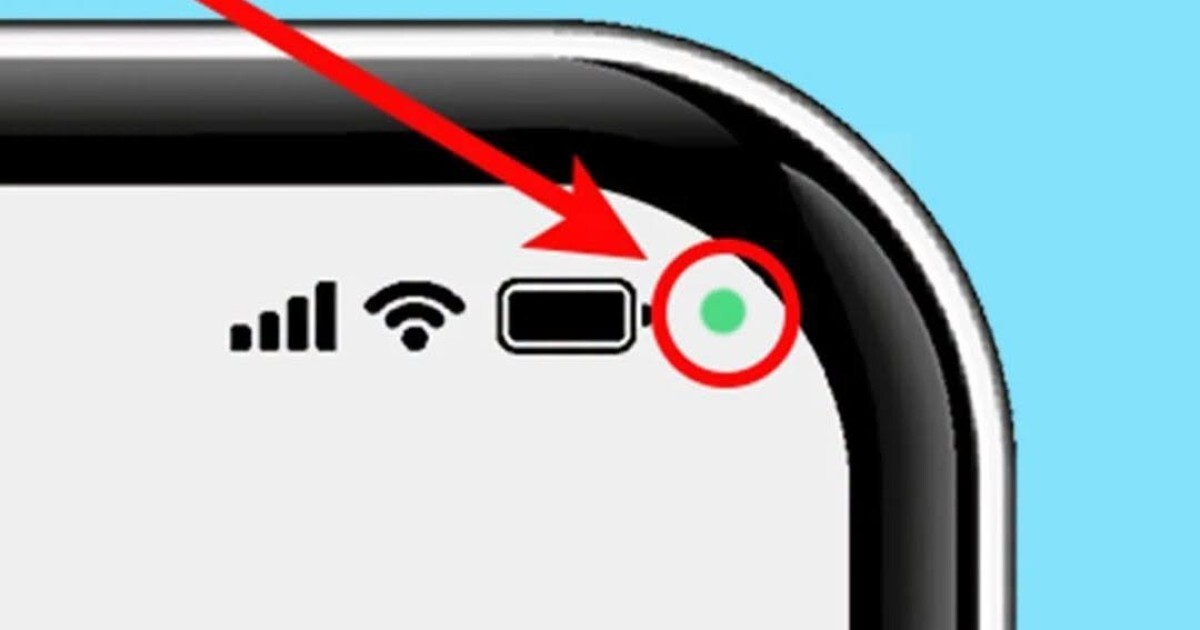
If you use a modern smartphone, you may have noticed a tiny green dot occasionally popping up in the top right corner of your screen—right next to your battery, Wi-Fi, or signal indicators. Because it appears without warning while browsing, using social media, or opening random apps, many users worry their phone has been hacked, infected with spyware, or secretly recording them.
Fortunately, that green dot is not a glitch or a sign of malware. It is actually a built-in, real-time privacy security indicator. In this complete guide, we will break down what the green dot means, how to check which apps are triggering it, and what steps to take if it appears unexpectedly.
What Does the Green Dot Mean?
Introduced in modern mobile operating systems (Android 12 and iOS 14 onwards), the green dot acts as a visual privacy light—similar to the tiny LED next to a laptop webcam.
-
Camera Active: An app is currently using your front or rear camera.
-
Microphone Active: An app is actively recording or listening to audio through your microphone.
-
Camera + Microphone: In many systems, the green dot indicates access to either sensor (or both simultaneously).
When an app requests access to these hardware features, the system automatically lights up the indicator in your status bar to keep you informed.
How to See Which App Is Using Your Camera or Mic
If the green dot appears and you want to know immediately which application is responsible, checking takes just a second:
-
Swipe Down: Swipe down from the top of your screen to open your Quick Settings or Control Center.
-
Tap the Indicator: At the top of the panel, you will see a green icon or pop-up displaying the exact app name (e.g., WhatsApp, Instagram, Camera, or Google).
-
View Permissions: Tap the notification to open the Privacy Dashboard or permission settings, where you can see a timestamped log of when apps accessed your sensors.
What to Do If the Green Dot Appears Unexpectedly
If the dot appears while you are using a video calling or camera app, it is working as intended. However, if it lights up when you are simply looking at your home screen or reading an article, follow these troubleshooting steps:
| Situation | Potential Cause | Recommended Action |
| Active Video/Voice Call | Expected behavior (Zoom, WhatsApp) | No action needed |
| Taking Photos / Scanning QR | Expected behavior (Camera app) | No action needed |
| App Open in Background | Social media or navigation app using mic/camera | Swipe app closed from recent apps menu |
| Unknown App Access | Misconfigured app or unwanted background permissions | Revoke camera/mic access in Settings > Privacy |
| Dot Remains Constantly On | Potentially malicious or rogue app | Run a security scan and uninstall recent unverified apps |
Managing Your App Permissions for Better Privacy
To maintain complete control over your phone’s sensors, regularly audit your app permissions:
-
Set Permissions to “Only While Using the App”: Never grant “Allow all the time” access for camera or microphone unless absolutely necessary.
-
Use the Privacy Dashboard: Check Settings > Privacy > Privacy Dashboard to review a 24-hour timeline of hardware access.
-
Mute Sensors System-Wide: On Android devices, you can add “Camera Access” and “Microphone Access” toggles to your Quick Settings panel to shut off sensor access across all apps with a single tap.
Conclusion
That mysterious green dot on your smartphone display is one of the most effective privacy safeguards built into modern operating systems. Rather than a reason to panic, it is an automatic security feature designed to give you complete transparency over when your camera and microphone are active. Knowing how to read it ensures your personal privacy remains firmly in your hands!
Frequently Asked Questions (FAQ)
Is the green dot a sign that my phone is hacked?
In almost all cases, no. The green dot simply shows that an installed app is using your camera or microphone. However, if it stays on continuously when no apps are open, review your installed apps and permission settings immediately.
What is the difference between a green dot and an orange dot?
On iPhones, a green dot means an app is using your camera (or camera + microphone), while an orange dot means an app is using only your microphone. On Android devices, a green dot is typically used for both sensor types.
Can I turn off the green dot indicator completely?
No, major operating systems do not allow users to disable the privacy indicator. It is a mandatory security feature intended to prevent rogue apps from silently spying on users.
Why does the green dot briefly flash when I unlock my phone?
If your device uses Face Unlock, the front camera briefly activates upon unlocking to recognize your face, causing the green dot to flash for a fraction of a second.
